7 Best Computer Repair Shops in Toronto for 2026
A computer repair shop should diagnose the problem before replacing parts, explain the total cost, tell you how long the repair should take, and state what warranty applies.
Toronto has independent repair shops, larger electronics chains, Mac specialists and mobile technicians. The right choice depends on whether you need laptop repair, desktop repair, data recovery, motherboard work, MacBook service or help with a slow computer.
This guide compares 7 computer repair options in Toronto and Scarborough using location, repair services, public business information, convenience and specialization.
Quick comparison
| Computer repair shop | Area | Good for |
|---|---|---|
| AM Wireless | Scarborough | Local PC and laptop repair |
| The Tec Fixer | Downtown Toronto | High-rated independent repair |
| ASK Computers | Downtown Toronto | Advanced diagnostics and board work |
| Rosedale Computers | Yonge Street | Established local computer repair |
| Canada Computers & Electronics | Downtown / multiple locations | Parts, upgrades and general service |
| WinMac Inc | Downtown Toronto | MacBook and Apple computer repair |
| TickTockTech | Toronto | On-site and mobile computer support |
Prices, turnaround times and warranties can change. Confirm current details directly with the repair provider before leaving your computer.
How we selected these Toronto computer repair shops
The shops in this guide were compared using factors that matter when choosing computer repair:
- Toronto or Scarborough location
- Laptop and desktop repair availability
- Types of problems handled
- Specialist repair capability
- Walk-in or mobile convenience
- Public customer-review information
- Published business details
- Availability of diagnosis before repair
AM Wireless publishes this comparison and is included in the list. Readers should compare current quotes and repair terms from more than one provider when the repair is expensive.
1. AM Wireless
Location: 3021 Kingston Rd, Scarborough, ON M1M 1P1
AM Wireless is an independent electronics repair shop in Scarborough serving laptops, desktop computers, phones and tablets. Its current Google Business Profile has a 4.9-star rating from 249 reviews, which gives customers a substantial amount of recent public feedback to check before booking. AM Wireless
Its computer repair services cover common hardware and software problems including:
- Computers that will not start
- Slow performance
- Laptop screen problems
- Battery problems
- Charging issues
- Overheating
- Storage upgrades
- Software problems
- Hardware diagnosis
AM Wireless provides a free diagnosis before repair and gives customers the repair price before work starts. Many common laptop and computer repairs can be completed the same day when the required parts are available. Covered repairs include a 10-day warranty on parts and labour.
Phone: +1 647 350 3939
Good for
Scarborough customers who want a local repair shop with a strong current Google review profile, diagnosis before repair, same-day service for many common jobs and clear warranty terms.
2. The Tec Fixer
Location: 275 Dundas St W, Toronto, ON M5T 3J9
The Tec Fixer is a downtown Toronto repair shop with a strong current public review profile. Current local business data shows a rating around 4.9 stars with more than 700 reviews, making it one of the more established highly reviewed independent repair options in central Toronto. The shop works on computers and other electronics.
Good for
Downtown customers who want an independent repair provider with a large volume of current customer reviews.
Before booking, ask about:
- Diagnosis fee
- Current repair turnaround
- Replacement parts
- Warranty
- Data handling
3. ASK Computers
Location: 111 Front St E, Toronto, ON M5A 4S5
ASK Computers is an established downtown repair business with a large customer-review history.
The company works on:
- Windows laptops
- Desktop computers
- MacBooks
- Phones
- Data recovery
- Motherboard problems
- Charging issues
- Liquid damage
ASK Computers is especially relevant when the problem may require more than a simple component replacement. Current local business data shows a rating around 4.7 stars with more than 700 reviews.
Good for
Customers with complicated hardware problems, motherboard faults, data recovery needs or computers that have already failed a basic repair attempt.
4. Rosedale Computers
Location: 919 Yonge St, Toronto, ON M4W 2H2
Rosedale Computers is a Toronto computer repair provider located on Yonge Street. Current local business information shows a rating around 4.9 stars with more than 200 reviews. Its central location can be convenient for customers around Rosedale, Yorkville and downtown Toronto.
Good for
Customers looking for a traditional local computer repair shop near central Yonge Street.
Before authorizing repair, confirm:
- Diagnosis cost
- Estimated turnaround
- Required replacement part
- Warranty
- Total labour cost
5. Canada Computers & Electronics
Location: 312 Yonge St, Toronto, ON M5B 1R4
Canada Computers is different from a small independent repair shop because it is also a major computer-parts and electronics retailer.
This can be useful when a computer needs:
- Storage upgrades
- RAM upgrades
- Replacement components
- General troubleshooting
- Desktop parts
- Hardware installation
Its Yonge Street location has a large volume of public customer reviews.
Good for
Customers who need computer parts, upgrades or general computer service and prefer dealing with a larger electronics retailer. Service availability and repair terms can differ by location, so ask the specific store what work it can complete before visiting.
6. WinMac Inc
Location: 384 Yonge St, Unit 14, Toronto, ON M5B 1S8
WinMac Inc focuses heavily on MacBook and Apple computer repair. Current local business information shows a rating around 4.9 stars with close to 300 reviews. A specialist shop can be useful when the computer is a MacBook and the problem requires experience with Apple hardware.
Good for
Customers with MacBook problems such as:
- Charging faults
- Display problems
- Battery issues
- Keyboard faults
- Logic-board problems
- Other Mac-specific hardware issues
Check your AppleCare or Apple warranty status before paying for independent MacBook repair.
7. TickTockTech
TickTockTech provides computer repair and support in Toronto with a service model that can include on-site assistance. Current local business data shows a rating around 4.8 stars with more than 180 reviews. A mobile or on-site repair provider can be useful when moving a desktop computer is inconvenient or when the problem involves a home or office setup rather than one isolated component.
Good for
Customers who want help at their home or workplace.
Ask whether your specific repair can be completed on-site or whether the computer needs to be taken away for further work.
Before You Replace Your Computer, Get It Checked
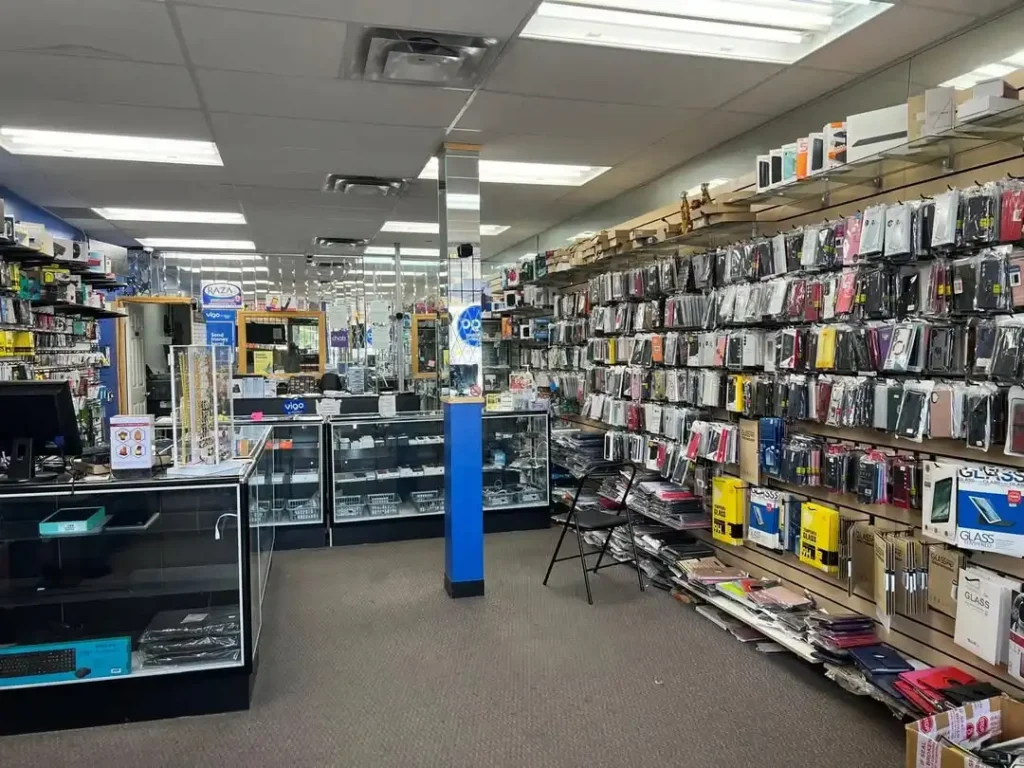
Many computer problems can be repaired quickly and affordably. Visit AM Wireless in Scarborough for a free diagnostic, same-day computer repair, and warranty-backed service before spending money on a replacement.
What types of computer problems can repair shops fix?
Computer repair covers both hardware and software problems.
Common jobs include:
Slow computers
A slow PC may have:
- Too many background processes
- Insufficient RAM
- Failing storage
- Malware
- Overheating
- Software problems
- An old hard drive
Diagnosis should identify the cause before new parts are installed.
Computers that will not turn on
Possible causes include:
- Power supply
- Battery
- Charger
- Motherboard
- RAM
- Charging circuit
- Power button
- Internal connection
A computer that does not power on should be diagnosed before any component is ordered.
Broken laptop screens
Screen replacement may be required when the display has:
- Cracks
- Black areas
- Vertical lines
- Flickering
- No image
- Physical impact damage
The exact screen model matters because laptop panels use different sizes, resolutions and connectors.
Overheating
Overheating can result from:
- Dust
- Blocked vents
- Failed fans
- Dried thermal compound
- Heavy workload
- Cooling-system damage
A cooling service may involve cleaning, fan inspection and thermal maintenance.
Hard-drive and SSD problems
Storage problems can cause:
- Slow startup
- File errors
- Windows crashes
- Missing files
- Failure to boot
- Unusual drive noises
Back up important files when a drive begins showing signs of failure.
Virus and malware problems
Software cleanup can help when a computer shows:
- Unexpected pop-ups
- Browser redirects
- Unknown programs
- Severe slowdown
- Suspicious startup programs
A technician should explain whether the computer needs malware removal, operating-system repair or a full reinstall.
Motherboard problems
Motherboard repair can involve:
- Power faults
- Charging circuitry
- Short circuits
- Damaged ports
- Liquid damage
- Failed components
Board-level repairs usually require more diagnosis than a screen, battery or storage replacement.
How much does computer repair cost in Toronto?
Computer repair in Scarborough prices vary widely. A basic software problem may cost much less than motherboard work, advanced data recovery or replacement of an expensive display. Typical repair categories can include:
| Repair | Common general range |
|---|---|
| Basic software troubleshooting | $60–$150+ CAD |
| Virus or malware cleanup | $70–$150+ CAD |
| Laptop screen replacement | $120–$350+ CAD |
| Battery replacement | $80–$180+ CAD |
| SSD upgrade | $120–$250+ CAD |
| Charging-port repair | $80–$180+ CAD |
| Motherboard repair | $150–$500+ CAD |
| Data recovery | $150–$500+ CAD |
These are general market ranges for computer repair cost in Canada. Exact prices depend on the computer model, required part, labour and the extent of the damage. Request a written or clearly explained quote before approving expensive work.
Laptop repair vs desktop computer repair
Laptop and desktop repairs can require different skills and parts.
Laptop repair
Laptop repairs often involve:
- Screens
- Batteries
- Charging ports
- Keyboards
- Hinges
- Fans
- Motherboards
- Storage
The compact design can increase labour because several components may need to be removed to reach the failed part.
Desktop computer repair
Desktop repairs commonly involve:
- Power supplies
- RAM
- SSDs and hard drives
- Graphics cards
- Cooling
- Motherboards
- Windows problems
- Component upgrades
Desktop components are often easier to access and replace.
PC repair vs Mac repair
Windows PCs and Macs can have different repair requirements.
Windows PCs
Windows computers come from many manufacturers including:
- Dell
- HP
- Lenovo
- ASUS
- Acer
- MSI
Parts and internal layouts differ significantly between models.
Mac computers
MacBook and iMac repairs can require Apple-specific parts and procedures. Check any active AppleCare or Apple warranty coverage before using an independent repair shop.
Same-day computer repair in Toronto
Some computer problems can be fixed the same day.
Common examples include:
- RAM upgrades
- SSD installation
- Simple software repairs
- Basic cleaning
- Some laptop batteries
- Some laptop screens
Same-day service depends on:
- Required part
- Computer model
- Shop workload
- Diagnostic time
- Complexity of the problem
A motherboard fault or liquid-damaged computer usually requires more time.
Call before visiting if you need the computer returned the same day.
How to choose a computer repair shop
Ask these questions before approving a repair:
- Is diagnosis free or paid?
- What is the full repair cost?
- Is labour included?
- What part will be installed?
- How long should the repair take?
- What warranty applies?
- Will you contact me before performing additional work?
- Will my files need to be accessed?
- Can you back up my data first?
- What happens if the repair does not solve the problem?
Clear answers make repair quotes easier to compare.
What to do before leaving your computer at a repair shop
Back up important files
Create a recent backup if the computer still works.
Store important documents, photos and work files somewhere separate from the device.
Bring the charger
For laptops, the charger can be part of the problem.
Bring it when the issue involves charging or power.
Record the computer’s condition
Photograph the:
- Screen
- Lid
- Keyboard
- Case
- Existing physical damage
This gives both you and the repair shop a record of the device’s condition.
Ask about passwords
Some repairs may require the technician to log into Windows or macOS for testing.
Ask whether access is necessary before providing a password.
Explain what happened
Mention:
- Drops
- Liquid spills
- Recent upgrades
- Previous repairs
- Error messages
- Unusual sounds
- When the issue began
Specific symptoms make diagnosis easier.
Is local computer repair cheaper than a big-box store?
There is no rule that local repair shops are always cheaper.
A small independent shop may have lower labour costs for some repairs.
A larger retailer may have better access to certain parts or standardized services.
Compare the complete quote rather than assuming one business type will cost less.
Check:
- Diagnosis
- Part
- Labour
- Warranty
- Turnaround
- Data backup
- Additional fees
How to compare computer repair warranties
Warranty length alone does not tell you what is covered.
Ask whether the warranty covers:
- Replacement part failure
- Labour related to the repair
- Repeat failure of the same issue
- Diagnostic fees
- Physical damage after repair
- Liquid damage
Get the warranty terms before paying.
Computer repair in Scarborough
AM Wireless provides laptop and computer repair at:
AM Wireless
3021 Kingston Rd
Scarborough, ON M1M 1P1
Phone: +1 647 350 3939
Common services include:
- Desktop computer repair
- Laptop repair
- Screen problems
- Battery issues
- Charging faults
- Storage upgrades
- Slow computer diagnosis
- Overheating
- Software troubleshooting
Free diagnosis is available before repair.
Many common jobs can be completed the same day when the required part is available.
Is it worth repairing an old computer?
Repair can make sense when the computer still meets your needs and one failed component is causing the problem.
Consider:
- Age
- Processor
- RAM
- Storage
- Current performance
- Operating-system support
- Repair cost
- Replacement cost
- Other existing problems
Example: an SSD upgrade and fresh operating-system setup can give a usable computer several more years of life.
A computer with motherboard failure, a damaged screen, weak battery and limited software support may require more money than it is worth spending.
Frequently Asked Questions
What are the best computer repair shops in Toronto?
Current Toronto options include AM Wireless, The Tec Fixer, ASK Computers, Rosedale Computers, Canada Computers, WinMac Inc and TickTockTech.
The right shop depends on the computer, location and repair required.
Which computer repair shop is best in Scarborough?
AM Wireless is one local Scarborough option at 3021 Kingston Rd. It provides diagnosis and repair for laptops and desktop computers and includes a 10-day warranty on covered repairs.
How much does computer repair cost in Toronto?
Many common repairs can cost from about $60 to $500 CAD or more. Software work and basic upgrades tend to cost less than motherboard repair or advanced data recovery.
Can a computer be fixed the same day?
Some repairs can. Simple software problems, upgrades, cleaning and common part replacements may be completed the same day when parts are available.
How much does laptop repair cost?
Laptop repair can range from about $60 to $500 CAD or more depending on the problem. Screen replacement, batteries, keyboards and motherboard repairs all have different costs.
Should I repair an old PC or buy a new one?
Compare the repair cost with the computer’s age, performance and replacement cost. A storage or RAM upgrade may be worthwhile on an otherwise usable computer. An expensive motherboard repair on an old low-spec system may be harder to justify.
Final comparison
AM Wireless is a strong local option in Scarborough for diagnosis and same-day repairs. The Tec Fixer and ASK Computers suit downtown customers, while WinMac Inc focuses on Mac repairs. Canada Computers is useful for parts and upgrades, and TickTockTech offers on-site support.
Compare price, repair time and warranty before choosing a shop.